



How to Use the Drawer (App List)
UPDATE: 2026.02.02
+HOME is an Android customization app that allows you to personalize your smartphone in your own way. This article provides a detailed introduction to how to use the drawer (app list) for those who are considering starting with +HOME.
What is the Drawer (App List)?
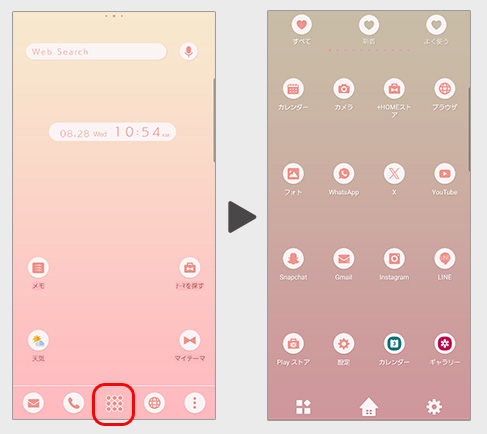
It is a page where you can see a list of all installed apps (hereafter referred to as the 'drawer').
It will appear when you swipe up on the home screen or press the button in the center of the dock bar.
About the Button:
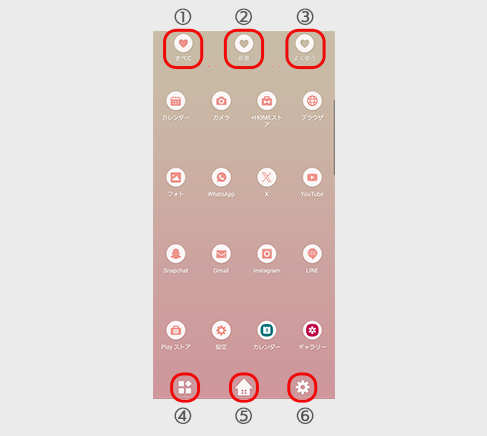
① All
All installed apps will be displayed.
② New
Recently installed apps will be shown.
③ Frequent
Apps that you use frequently will be displayed.
④ Sort & Uninstall Button
You can sort the apps in the drawer and uninstall them.
⑤ Home Button
You can return to the home screen.
⑥ Settings
You can configure various settings for the drawer.
How to Add an Icon to the Home Screen
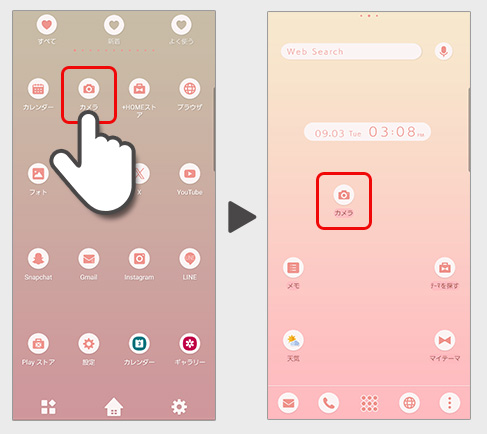
Press and hold the icon and move it to switch to the home screen.
You can place an icon on the home screen
How to Sort Apps in the Drawer
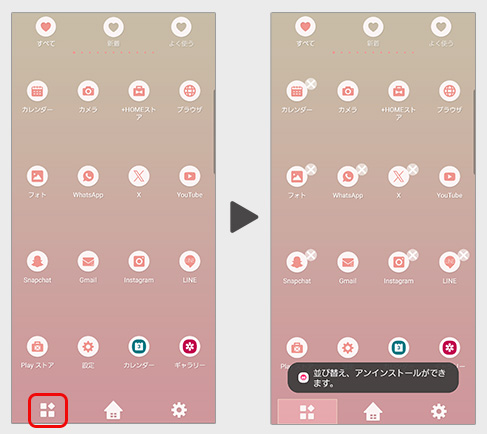
1. Tap the icon located at the bottom left of the drawer.
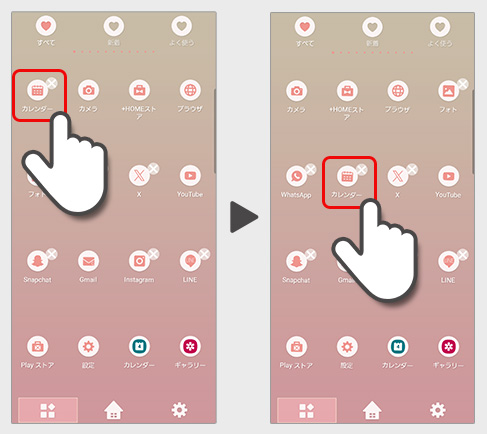
2. Long-press the app you want to move, then drag it to the desired location.
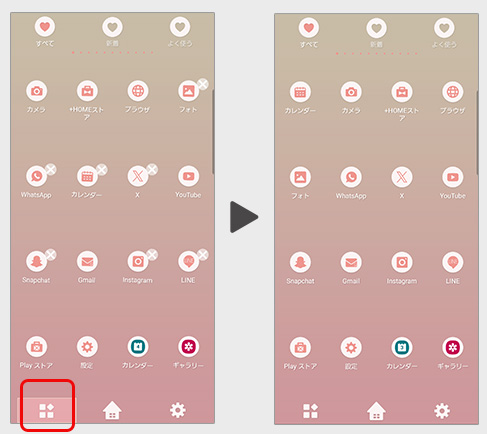
3. Once you’ve finished moving the apps, tap the icon at the bottom left of the drawer again to return to the main drawer.
List of How to Use +HOME
-
About the Home Screen
-
Let's Change the Theme
-
How to Use the Drawer (App List)
-
Mastering the Home Screen
-
About the Iconpacks
-
How to Change Home Screen Icons Individually
-
How to Change Home Screen Icons All at Once
-
How to Change Home Screen Icons with Your Favorite Images
-
How to change home screen icon size
+HOME Special Features List.
-
✨ Cool Men's Theme Special ✨
Must-haves for the popular guy! Dress up your phone with guitar and campfire themes for a stylish yet rugged look 1️⃣
-
💜 Special Feature: Scenes with Wisteria Trellises and Flowers 💜
Get the most dramatic home screen, adorned with elegant Japanese charm and beautiful colors, featuring a theme of enchanting wisteria trellises and regal flowers 💜
-
⭐ Star Special ⭐
Dreams and hopes connected by stars! Star motif designs perfect for mobile phone standbys ☆
-
🌸 Featured Cherry Blossom Photos 🌸
Decorate your smartphone with heartwarming pictures of cherry blossoms! A lot of designs to enjoy beautiful spring moments!
-
🎄 Christmas Tree Theme 2025 Special Feature 🎄
Get into the Christmas spirit! Brighten up your screen with a festive tree theme for your smartphone 🎄
-
🍣 Sushi and Japanese Sweets Theme Feature 🍵
Add delicious magic to your smartphone screen! With this Japanese gourmet design theme, enjoy a thrilling visual experience that makes your stomach rumble every time you look at it🍣😋
-
🌻 Summer Flower Theme Special 🌺
Decorate your phone with summer flowers! We bring you a Kisekae feature with sunflowers, lotus, and hibiscus-themed designs🌻
-
🥰 Valentine's Theme Special 2026 🍫
Add a touch of love magic to your smartphone screen! Start a happy digital life with Valentine's Day design themes that heighten your feelings for loved ones and treat yourself to a special mood ♥️
-
⛵ Resort Theme Special ⛵
Would you like to escape from your busy daily life and easily experience the feeling of a resort? In this special feature, we introduce dreamy resort wallpapers, skins, and themes for free. Incorporate pleasant beaches, beautiful mountains, and exotic tropical landscapes into your device and enjoy the feeling of travel anytime!
-
⚪️ Monochrome Design Special ⚫️
Renew your smartphone with stylish monochrome designs! Full of designs that bring out the beauty of simplicity!
-
🌻 Sunflower Theme Special Feature 🌻
Summer is here! Let's enjoy the hot summer with a sunflower theme that will brighten up your smartphone🌻
-
🌼 Lovely Cosmos Theme Special Feature 🌼
Relaxing moments on your smartphone screen! Feel the comfort of a soothing cosmos theme 🌼
-
🌌 Summer Night Sky Theme Special Feature 🌌
Feel the romance of summer on your smartphone! A special feature on summer starry sky themes✨
-
🐶 Healing Animal Theme Special 😺.
Decorate your smartphone with adorable animal designs! Don't miss out on our dog, cat and panda themed Kisekae specials 🐾
-
♥️ Pop Pattern Theme Special ♥️
A charming worldview that brightens every day! Transform your smartphone into the ultimate cute and stylish sanctuary with this dress-up theme featuring dancing hearts, cats, and flowers ♥️
-
✏️ Doodle Pop Wallpaper Feature ✏️
Get the Doodle Pop makeover and level up your home screen with cuteness! Claim this exclusive hand-drawn, street-style design as your own!
-
💙 Favorite Color Feature 💛
Find your favorite color! Ready for the concert? Boost your motivation daily with your favorite member's color!📣💜
-
✈️ Special Feature: Themes That Make You Want to Travel ✈️
Open your phone and find yourself in a foreign land! With these themes featuring breathtaking views from around the world, fill your screen with dramatic landscapes—from majestic nature to famous tourist spots—that will transport you on a journey ✈️
-
😍 Cute Fancy Theme Special Feature 😍
Experience a dream world on your smartphone! Full of cute motifs such as the popular Wish Core, Fancy, and Yumekawa😍
-
🍀 Special Features for Golden Fortune 💰
Dressing up with gold motifs for better luck in money! Special feature on themes that bring you luck!