



Let's Change the Theme
UPDATE: 2024.08.20
+HOME is an Android customization app that allows you to personalize your smartphone to reflect your unique style. In this article, we will introduce how to change themes for those who are interested in starting with +HOME.
How to Access the +HOME Store
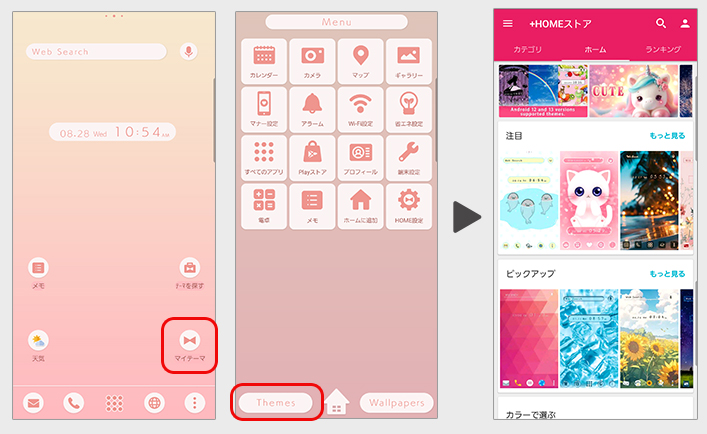
You can find the 'My Themes' icon on your home screen.
Access the customization store from the 'Themes' button located at the bottom left of the menu screen.
Tap on a theme that catches your eye♪
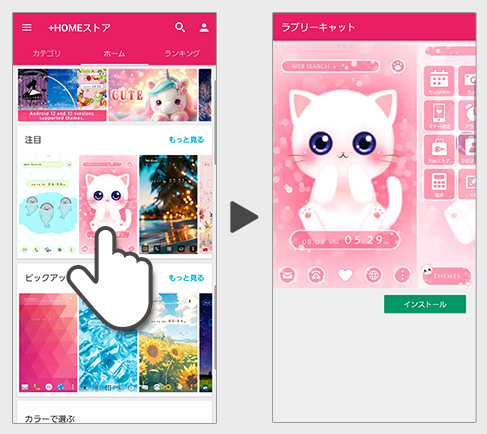
The +HOME Store features over 2,000 different customization themes!
Feel free to explore the categories and ranking tabs to find the perfect theme for you♪
If you find a customization that interests you, just tap on it. A detailed page of the customization will open.
Let's Install the Theme
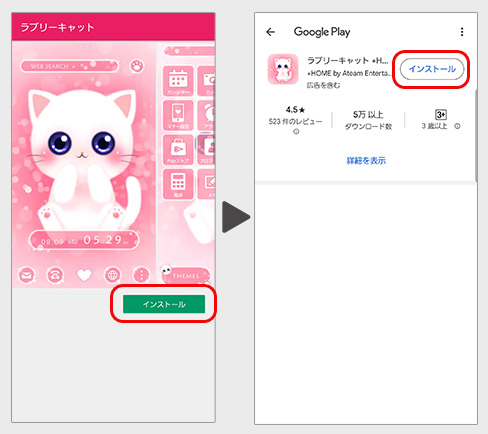
If the install button is displayed, please download the theme from Google Play.
Let's Change to the Theme!
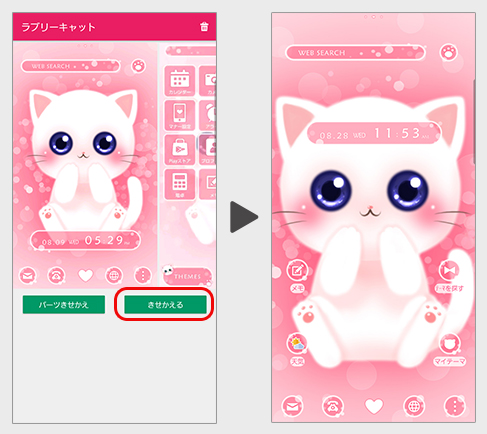
If the theme is already downloaded, press the customization button on the detailed page.
The customization will begin, and your home screen, menu, and drawer will all be completely refreshed with the new theme♪
List of How to Use +HOME
-
About the Home Screen
-
Let's Change the Theme
-
How to Use the Drawer (App List)
-
Mastering the Home Screen
-
About the Iconpacks
-
How to Change Home Screen Icons Individually
-
How to Change Home Screen Icons All at Once
-
How to Change Home Screen Icons with Your Favorite Images
-
How to change home screen icon size
+HOME Special Features List.
-
💧 Raindrop theme feature to get through the rainy season ☔.
Enjoy rainy days! Create a soothing space during the rainy season with raindrops and rain pattern-themed phone kisekae💧
-
🐈⬛ Cute Black Cat Theme Special 🐈⬛
A black cat that brings happiness comes to your smartphone! Feel a moment of peace with this adorable black cat theme🐈⬛
-
⚙️ Nostalgic Deco Themes 🔑
Turn your phone into a vintage antique space! Featuring old keys, stamps, and gears, own this unique aesthetic. Customize your home screen now!
-
🌴 Palm tree theme special 🌴
Bring a summer vacation to your phone! Please enjoy the stylish and fashionable replacement designs with palm tree motifs 🌴
-
🍘 Japanese Sweets & Japanese-Style Theme Special 🍘
Admire Japan's traditions on your smartphone. Get an elegant screen adorned with the seasonal charm and lovely colors of Japanese sweets and motifs right now! 🍘
-
🏝️ Tropical Theme Special Feature 🏝️
Bring on summer! Get that tropical resort vibe with tropical smartphone skins🏝️
-
🍀 Featured clover for good luck 🍀
Grab good luck! Why not add a little surprise to your daily life with a smartphone Kisekae theme with a clover motif?
-
😀 Funny Themes That Make Every Day More Enjoyable 😀
Bring laughter and healing to your phone! Enjoy a super happy home screen every day with this fun food theme, featuring expressive breakfasts and colorful ice cream😀
-
🥀 Princess Gothic Wallpaper Feature 🥀
Get the Princess Gothic makeover! Bring a magical world of castles and butterflies to your phone and own this exclusive Gothic Lolita dream space 🥀
-
✏️ Doodle Pop Wallpaper Feature ✏️
Get the Doodle Pop makeover and level up your home screen with cuteness! Claim this exclusive hand-drawn, street-style design as your own!
-
👀 Eye-Friendly Color Themes Special Feature 👀
Eyes-friendly soothing colors! Create an easy-on-the-eyes display with pastel and muted color themes👀
-
🦜 Cute Birds Special 🦜
Feature on bird motifs to decorate your smartphone standby screen in a cute way! Adorable designs will soothe your heart.
-
⛄️ Winter Scenery Theme ⛄️
Enjoy winter's breathtaking views on your phone! Fill your screen with a serene silver world through beautiful snowy landscape themes ⛄️
-
🕯️ Spooky Halloween Theme Special 🎃
Enjoy a spooky night on your smartphone! Create horror and dark screens with Halloween theme packs 🎃
-
💜 Featuring a beautiful purple color 💜 .
The theme is full of elegant and romantic designs with motifs of starry skies and flowers with purple as the main color💜
-
🍓 Cute Strawberry Special 🍓
Featuring sweet and sour and cute strawberry designs! A variety of pop and adorable themes are available!
-
🟢 Fresh green feature 🟢
Refresh your mood! Feel the fresh air every time you open your screen by dressing your phone in green color♪
-
☕ Cozy Special ☕
Relaxation time you can feel on your phone! A variety of stylish and relaxing designs!
-
📱 Home Screen Refugees: Find Your Next Theme 📱
Are you worried that your smartphone life is on hold because ""the app you’ve loved for years is shutting down...""?We, 「+HOME」, are here to fully inherit the joy of instant, complete home screen makeovers.
-
🌱 Featured fresh new greenery 🌱
Dye your phone with a new green color! Peace of mind with a green dress-up theme that's easy on the eyes and relaxing... ♪